A Full Motion PC Monitor Arm can help you to read sheet music on your computer

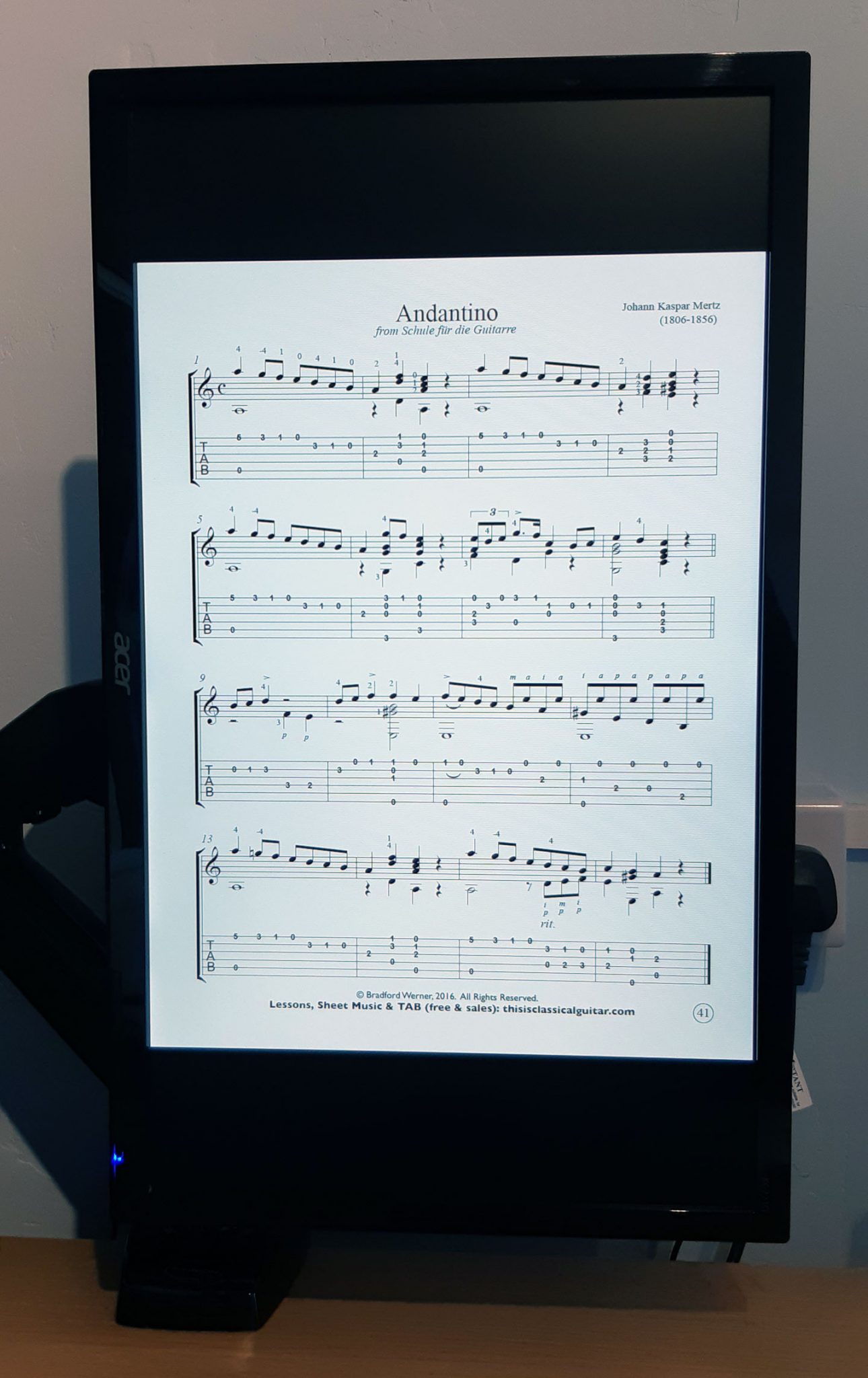
Today I installed a Full Motion PC Monitor Arm to my desk so that I can rotate my PC screen to read sheet music easily.

As I have been doing more teaching from home, and also have had more time to practice my instruments, I have been getting increasingly frustrated when reading music, because in Landscape mode it involves a lot of scrolling. You have to scroll much more frequenly than if the screen was in portrait mode.

I asked my techy gamer friend which one she has in her setup that I have seen, and she said to get this one, so I did.

Moving the monitor and benefits

I can now move the screen into portrait and load up a guitar book pdf and play away. You can go into full screen mode (Ctrl+L) and then press the down arrow key to move to the next page. Or you can use one of the other viewing methods without full screen mode and that way you can see a bit of the next sheet, and then press the down arrow to scroll or PgDn button to jump lower, or use the mouse.

To move the monitor, you can grab the screen and twist it around to make it portrait or landscape, or anything in between. You can also tilt it forwards and backwards and also move it left to right so that it can face someone to your left or right. This I think will come in very handy, because when I have been doing skype lessons on drums, I have been dragging my monitor around to face the drums, so this will be much easier, as you ust move it and then it stays in that position, so no screwing etc to move it.

How to change from Portrait to Landscape

To change the screen orientation to portrait in windows 10, you can right click on the desktop and click ‘Display Settings’ and change it there. My graphics card doesn’t allow the hotkey to change it annoyingly, but most people can change the screen orientation by clicking Ctrl+Alt+arrow keys.

Other Uses

The arm will help in lots of other ways too, like moving the screen so I can see it from the floor for workouts. I have been using the office to do home workouts from centr.com (unleashed and the da rulk masterclass have been enjoyable) and some others like Shona Virtue’s Fitness Programme after purchasing a cheap 8kg kettle bell from Aldi (was a rare find as weights were scarce).

I’m sure it will come in handy for positioning the monitor for gaming too, with a particular interest in F1 games.


All That Jazz: How to Get Started Playing Jazz Guitar

Photo credits: Marius Masalar and Katie Montgomery.

Guest post by Know Your Instrument.


Eager to begin your jazz guitar journey but don’t know where to start? You’ve come to the right place to get the top tips for jazz guitar beginners. Here we’ll discuss the things you need to do first when you set out to become a jazz player.

Ready? Here we go!

Get the basics down

We’re talking about guitar basics. If you’re going to be playing jazz, it’s a must for you to already be able to play the guitar, and play it well. If you are confident in your playing skills, have a good mastery of chords and scales and have a repertoire that includes a few jazz standards (‘The Girl From Ipanema,’ ‘My Funny Valentine,’ and ‘Fly Me to the Moon’ are a few examples), then you’re ready to focus on jazz music.

If you’re not quite there yet, then we suggest getting more practice time in. Supplement your learning with more songs from various artists so you can further develop your ear – and your playing style – for jazz music.

Get a good guitar

While you can definitely get a good jazz sound from a standard solid-body electric guitar, if you really want a really nice jazzy tone then you’ll have to get a guitar that’s designed for playing jazz music. Solid-body electrics are built more for rock, but there are those like the Fender Jazzmaster that’s really built for jazz.

Of course, nothing beats semi-hollowbody and hollowbody guitars when it comes to making jazz music. Some of the best guitars for jazz are of these body types. Check out the Gibson ES-335, Epiphone Sheraton II-PRO and the Ibanez Artcore AS73, which are all semi-hollow, and the Epiphone Emperor Swingster, which is a hollowbody guitar. For budget-conscious beginners, the Epiphone and Ibanez models come highly recommended.

Learn to read music


Legendary jazz guitarist Wes Montgomery couldn’t read notes but he didn’t really have to, being the fretboard genius that he was. Unfortunately, many of us don’t have the same natural, innate ability to create melodic lines and navigate our way across the fretboard without the aid of music sheets.

So, unless you have Montgomery’s talent, reading music is a skill you must learn to become a good jazz guitar player. This skill is a plus too if you’re looking to teach guitar or compose your own music in the future.

Expand your repertoire

Once you’ve started to listen to more jazz tunes and read music, you can now increase your repertoire and really learn to play jazz. Start with songs you like – learn to play the melody first and then the chords. Break down each section and get it right before moving on to the next.

The more you listen and play, the more you will be able to internalize the rhythms, melodies, harmonies and the various song forms in jazz music. You won’t simply be imitating or memorizing jazz standards, you will actually be expressing jazz. This will not only help you in doing improvisations but also in becoming a better jazz guitarist overall.

Final Word

The most important thing you need to do when you start learning jazz guitar is to develop a thirst for knowledge. Keep on learning and honing your playing skills and technique. Be conscious of what you still need to know and improve on to become a better player and work on it. Practice regularly and soon you’ll be able to improvise with ease, play sophisticated solos and express your own musical voice. Good luck!

Connection Between Guitar Fretboard And Piano Keyboard

  • How are guitar fretboard and piano keyboard related?
  • Will it be easier for guitarist learn piano notes or pianist learn guitar notes?

Today, our guest Neil from Sublimelody.com brings us a visual guide to answer two questions above.

Let’s get started.

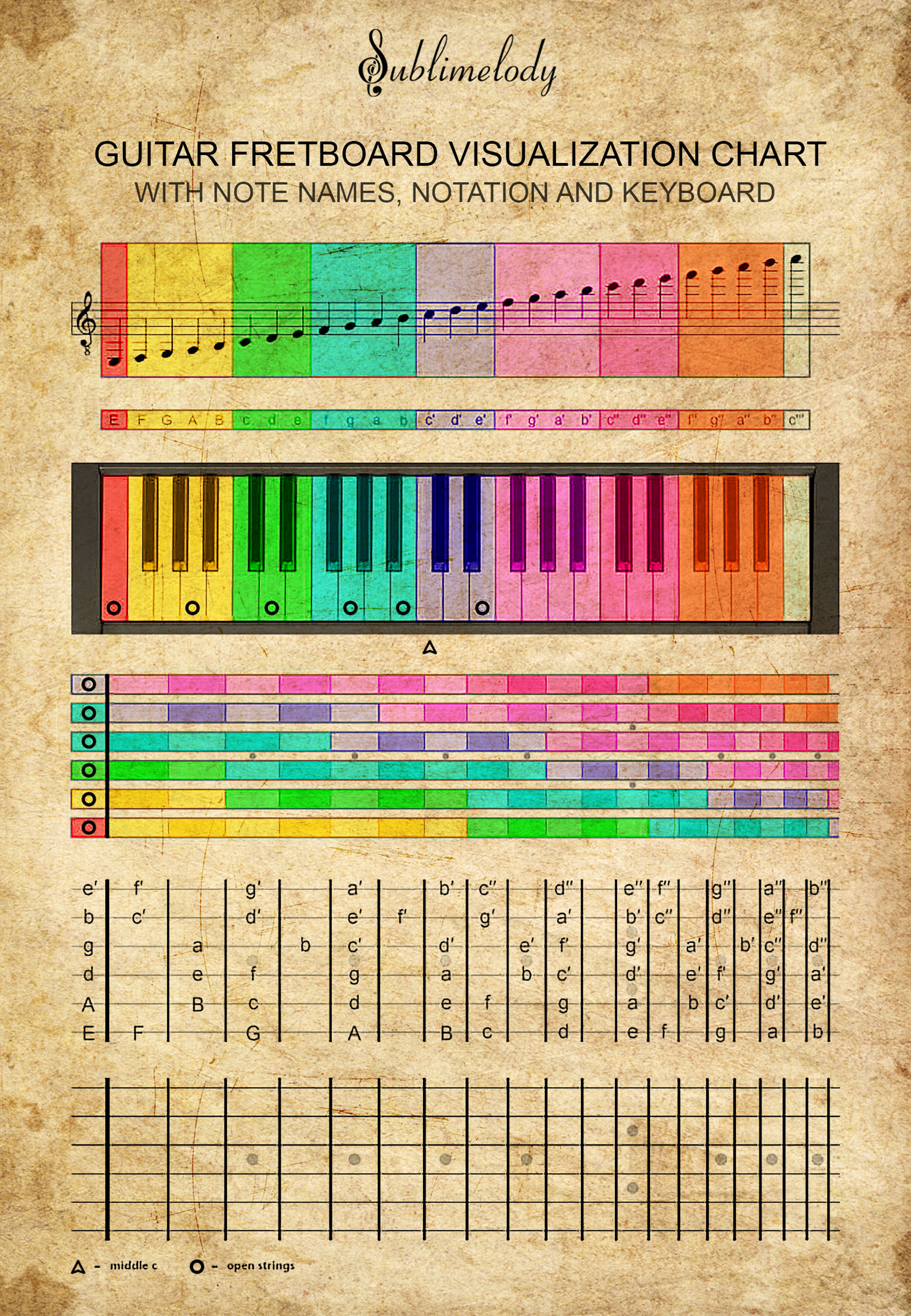
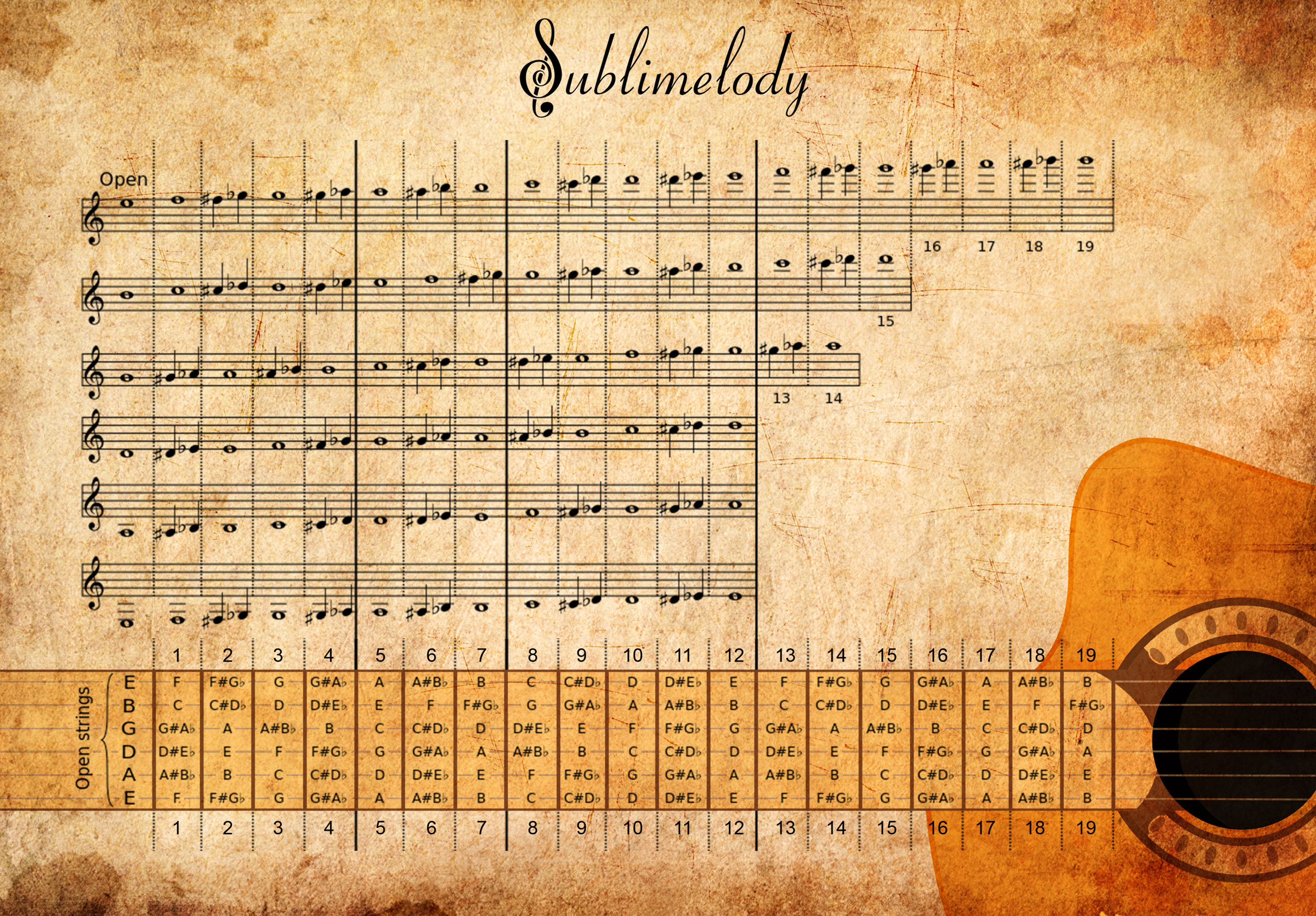
1. Music Notes And Fret-Strings On The Guitar Fretboard

The diagram below shows you the connections between music notes and their corresponding string-frets on a standard classical guitar fretboard.

As you already know, we use the treble clef in guitar sheet music.

Each music note on the sheet music often has two or more corresponding string-frets on the guitar fretboard.


We call the string numbers by standard order. From the bottom to the top of the diagram above:

  • E (on the bottom) is the 6th string
  • A is the 5th string
  • D is the 4th string
  • G is the 3rd string
  • B is the 2nd string
  • E (on the top) is the 1st string


Let’s see how we can use the chart above to read music note and its corresponding string-frets:

Where is this note on the fretboard (G4)?

Look at the diagram above, we can see its positions on the fretboard are:

  • 5th string and 10th fret
  • 4th string and 5th fret
  • Open 3rd string


It’s not so hard, isn’t it?

Well, from a pianist point of view, it’s a bit complicated to learn guitar notes. Since to play the G4 note, we have 3 positions to choose from.

And each string is like a mini-piano-keyboard. Therefore, we have 6 keyboards!

Now, let’s move to the next section to see how music notes and piano keys are connected.

2. Music Notes And Keys On The Piano Keyboard

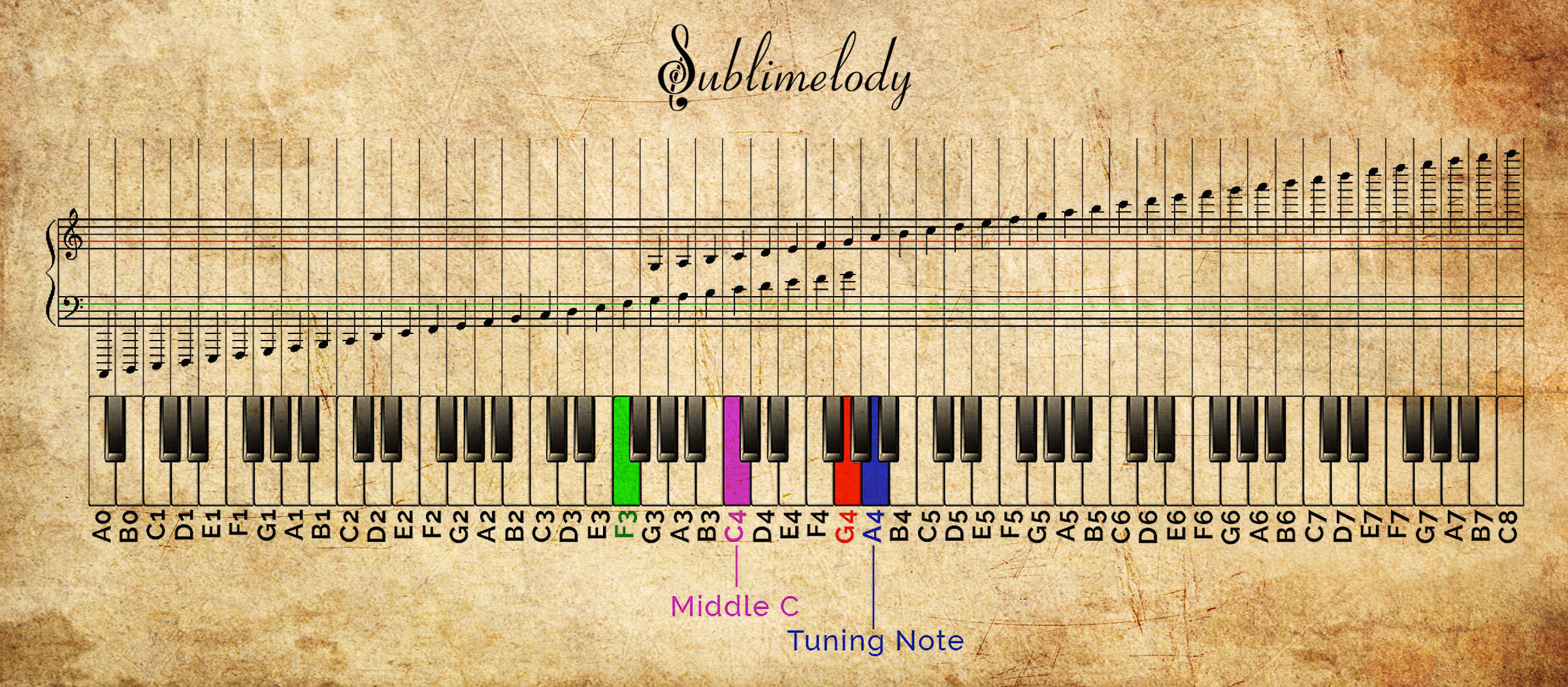
The diagram below shows you the connection between music notes and piano keys.

It may seem complicated at first, but if look closely, you will see that’s pretty simple.


From a guitarist point of view, a piano keyboard is just a string of a guitar. Each piano key is similar to a guitar fret.

The difference is the this “piano string” is much longer and presents wider pitch range than a guitar.


So, learning piano notes seems pretty easy for a guitarist.


Also, you may wonder what is the name of the clef below the treble clef. It’s the bass clef.

In piano, the left-hand plays notes on the bass clef and the right-hand plays notes on the treble clef.


If you want to learn more about reading piano notes and piano keys, and how to do sight-reading fast without memorizing a bunch of facts, click here to visit the visual guide from Sublimelody.


3. The Connection Between The Guitar Fretboard And The Piano Keyboard

Combine 2 diagrams above, and we have the following illustration:

Now, I guess you’ve got the point how music notes, piano keys, and guitar string-frets are connected.


And that’s it for my guide.


If you have any question about this guide, please visit sublimelody.com to get in contact.

30 essential productivity apps, business management tools and other apps or websites that help to run an online business and a local music teaching business

Here is a list of 30 essential productivity apps, business management tools and other apps or websites that help to run an online business and a local music teaching business.

The list here is what suits me and keeps me going as an individual business. There are other things I use but these are the main ones. These may not be suitable for everyone but they are all things that I happily recommend to others. Some are obvious, like the google products, but you might find a few that you haven’t heard of in the list.

Below the list is more information about how I use the things in the list to operate my businesses.

1. Google Calendar & synced to phone calendar (scheduling and also useful for setting reminders at specific times)
2. Google Docs / Spreadsheets (for creating invoices, records of who has paid, income spreadsheets). For offline and advanced database use, Libre Office Sheets and Calc are free and are just as good as Word and Excel imo.
3. Google Drive (access everything on the move; lesson plans, ebooks, records of who has paid invoices)
4. Google Keep (for saving photos or notes on the move)
5. Gmail (email)
6. Google Maps & Belkin Phone Holder (replaced sat nav)
7. Google Contacts (can group contacts into categories such as school names)
8. Remember The Milk (to do list, web and mobile app)
9. Mailchimp (mailing lists)
10. Payhip (for selling ebooks)
11. Paypal (payment processing)
12. Bandcamp (for audio downloads)
13. Ditto Music (digital distribution for music)
14. Sentric Music / Hit Licence (pitching music to tv / film etc)
15. BBC Weather Web / App (Try to dress for the weather)
16. WhatsApp (Reluctantly stay in close contact for certain projects)
17. Adsense (advertisement revenue)
18. Phone’s native clock, countdown timer and calculator
19. Heart Internet Web Hosting and Domains (to power the websites)
20. Drupal & WordPress (CMS for websites)
21. Spotify (always have access to songs that I need to teach)
22. DaTuna app (tune guitars using phone – android)
23. Justin Guitar metronome app
24. Abelton Live 9 (Suite) – Education Price (DAW for making music)
25. Dropbox or Wetransfer.com (sending / sharing large files)
26. Landr (Cheap and Easy Mastering Service)
27. Adobe Photoshop & Adobe Illustrator (for all artwork needs such as posters, music artwork, ebook covers, web banners etc.)
28. Adobe Acrobat Pro (for creating ebooks from single pdf files)
29. Guitar Pro (for creating lesson plans and sheet music for ebooks)
30. Quickbooks Self Employed (Used for Invoicing students’ parents every half term and for forwarding email receipts to record them in Quickbooks. It is basic, but it suits my needs.)


I do most of my work from a desktop computer. It’s pretty old school I know but actually I like sitting down at the desk and getting immersed and then being able to walk away and leave it, rather than have the temptation of trying to work on the sofa (I know some people that prefer the sofa though!). I keep my mobile contract slim and use a cheap to mid range phone, which is a smart phone, but it doesn’t cost loads.

My bookkeeping, teaching schedules, invoices, paid lists, have all been done using my own system of documents and spreadsheets that are quite refined and easy to use for my business now. I have recently moved onto Quickbooks Self Employed for invoices, which has made writing and sending them easier. My process to record payments for school lessons used to be to input it into a spreadsheet, then copy and paste into a ‘paid’ documents file for each given half term and school, and delete the pupil’s name that has been paid for. I would then check who still needs to pay. My invoices use a template I made and I had a copy of that in the same folder as the paid file for each half term and school name. The invoices always include payment info and at the top of that list is bank transfer details because that form of payment has the least admin for me. I then export that as a pdf file and email the parents at the start of a half term. Mostly I have to make different ones for each half term and ammend for different pupils if they have missed lessons or have not paid for a half term.

I also have a spreadsheet of all of my pupils in each school and their instrument and time details, and rows of checkboxes so I can print them off and use them as a rota for the half term. In high schools the rotas need to have time slots added to the rota. For primary schools, they are too hectic and unpredictable to make rigid timetables for, so I don’t bother. At the start of a new half term, I will copy over all the files from the previous half term and begin editing them for the next one. Usually the amount of weeks per half term changes so there is always something to change. I leave an extra list of pupils per school in the paid files so that I can copy them into a fresh ‘unpaid’ area below, and then I can delete them off as they pay.

I keep an up to date copy of parents’ email addresses in Google contacts and group them into different schools and also give them instrument tags incase I need to email all of the guitarists for something at once. I always try to email the parents using the bcc send field, and this is easy on a computer with a mouse because you can select all the contacts from google contacts, and click to send email, then drag all the addresses into the bcc field. I also have a mailchimp list but it’s not easy to keep that updated as well so I tend not to use it. I do for my website subscribers though.

For my websites www.learndrumsforfree.com and www.learnguitarforfree.com most of the files are hosted on the websites. I learned how to make websites before starting to teach, which has really given me the tools to build an online business too. I learned html and css using an O’Reilly book and the rest followed from there. Actually it all started from the coding features on myspace when bands could change the styles on their pages and adding in banners etc. My sister does web design and artwork in the music industry and she said that probably started her off too, or gave her the coding bug. I use dreamweaver to edit code because the colours are useful, but other free ones are available, and filezilla for ftp file transferring.

I use payhip for all of my pdf ebooks, which is the best I have found. It links to paypal for payments and it has just added a feature to automatically add customers to mailchimp lists. People that download free ebooks are added to my regular subscriber list for upadtes of free blog posts, and paying customers are added to a special list, which I send info of new ebook products to when they are released. Bandcamp is used in a similar way for audio and music, although their mailing list integration is not as good so I can’t really use that effectively at the moment unless I set up more accounts and then export email addresses to the appropriate subscriber lists.

I have found that social media is pretty much a waste of time for my online business at the moment but the mailing list is great, and actually pinterest generates the most hits, so I do chose to get rid of all but the pinterest. It’s all about finding what works for your business and choosing the right platforms to get the most out of your time and effort.

I get many hits per day on both sites quite often and almost all the traffic is organic from search engines. It’s taken years to build up so it really is a lot of hard work but adding to it “little and often” really helps build up a huge site over time. Most of my ebook sales follow searching for free stuff from organic google searches and then discovering the ebooks. I believe this is called a “fremium” business model. When I launch a new ebook and send it to my paying customers mailing list, I usually get quite a few sales from them, so that is really useful for me and them.

Hopefully this gives gives you ideas for your own online business. I tried in the past setting up my own ubercart shopping cart and hosting everything myself, but I had to switch to payhip due to new EU tax rules on digital products. It was too hard to manage myself but payhip and bandcamp both sort sll this out for you. For every ebook sale, payhip takes off the tax, which is different depending on each country, from the money I receive, so they literally take care of everything without me needing to register to pay tax in every country. It completely took the hassle away from thiose new laws.

I also make music and play in a band so I have an unlimited ditto music subscription to release to spotify and itunes etc. whilst bandcamp is the best, not all customers are used to that so you kind of have to make things available where the customers are.

Guitar Pro is the best in my opinion! I’ve tried Sibelius but that’s probably only better for orchestral stuff. Guitar Pro is amazing for most instrumentsl sheet music writing, including guitar, drums, ukulele, bass and even instruments such as flute and piano. I always use it for all of my sheet music. I even use it to export midi to Abelton sometimes, rather than using the piano roll to input midi.

Abelton has been great for making music from midi, recording my own music, making backing tracks, and for teaching other music production. The education price helped me to buy it. Landr is a quick, easy and cheap way to finish off tracks so they are ready to release. The mastering is pretty good. I subscribe for a month and then cancel it when I am done.

All of the chaos that is my schedule is fairly organised with Remember The Milk and Google Calendar. Both can set tasks and appointments to repeat weekly or as often as needed, which is really useful. I use both services on the desktop and synced to my phone. My email is also really important for my business. I sometimes send emails to myself with important TO DO list items for that day, so I can’t possibly miss them.


Related: (www.learndrumsforfree.com) 10 tips and advice for running your own drum teaching business

11 tips and advice for running your own guitar or ukulele teaching business

Photo by rawpixel.com from Pexels


Whether you are thinking of starting your own music leaching business, or looking for ways to improve the management of your self employed music lessons business, these 10 tips have been written with you in mind. All of these bits of advice are related to my own business and are things that I do or have learned throughout the 6 years of teaching music in schools and doing private lessons, while being self employed and organising everything else involved outside of the actual teaching.

1. Plan your week with a digital calendar

Easily manage your schedule online and sync it to your mobile devices. Reschedule lessons on the move and set reminders to pop up at certain times if needed. The main advantage of a digital calendar is that you can schedule recurring lessons to be the same every week, and then modify each one individually if you need reschedule for one week – saving you lots of time writing in the same things into your calendar each week. I use google calendar and sync it with my phone’s calendar.

2. Get a digital to do list

A todo list that syncs to your phone, like Remember The Milk, is very useful and can help build up your reputation of someone that is reliable, because you will actually follow through with the things you say you will do. There is always something that crops up in the day that needs to be addressed at a later time. A busy music teacher can have hundreds of little tasks in a week that crop up, and adding them to a todo list will make sure they get done. Tip: On super busy times, sometimes I do ignore my to do list so I email myself absolute must do things so I can’t ignore them.

3. Organise your lesson plans and content

Structure your teaching into ability levels and topics. Make sure you are covering everything that you should be teaching to the best of your knowledge. Create lesson plans or exercise sheets, or compile ones from books or online lessons. Keep digital files and print as needed. I keep my files in google drive so I can use them on the move. Don’t hand write everything in your own time unless you are only doing it once and photocopying it for future lessons. You should end up with more content than you can carry with you at once. Therefore you might want to structure lesson material into different topics throughout the year, or use or create a series of books that the students can progress through.

4. Use books and booklets rather than individual lesson handout sheets most of the time

If creating your own lesson plans, try to compile them into a book or booklet that can be printed out and stapled or binded together, or used as an ebook. This will mean you won’t need to worry about printing off new lesson handouts every week or so. Even better, the student will be able to visualise their progress as they make their way through the book. Furthermore, you could think about selling your books online. It can be a nice way of passively bringing in an extra income while you are doing other things. I use a company called Payhip to sell my ebooks and premium downloads.

5. Offer to teach grades

Working through a grade book is a good way of learning and teaching. Make sure you only teach grades that you could do yourself. You should always be at a higher grade than what you are teaching, and ideally be several higher.

Grade 6-8 award ucas points, which are a good incentive to start learning early and have dedication to progress up through the grades before university age, where extra ucas points might prove useful.

6. Dress smart and be professional

If you take your job seriously and want your students and parents of students to take you seriously then I believe you need to make the effort to look smart whilst working. You might also be a musician and have a strong image as well, but it is best to save certain things for the stage. Being your own boss is great so you don’t have to, but people feel more comfortable if you make the effort with your appearance, especially if you work in schools as a peripatetic music teacher.

7. Make sure you work enough hours per week

Music teachers can charge much more than minimum wage, which is great unless they don’t do enough billable hours. To make this job pay a decent wage you need to make sure you are putting full time hours during term time at least. It is easy to fall for the illusion of charging a high hourly rate, and working part time hours, only to end up with a low income at the end of the year.

8. Have music related goals and activities outside of your teaching

Keep your dreams, goals, ambitions and love of music alive. You might downsize them as the years pass by, but always remember why you play your instruments and do all you can to be a musician as well as a music teacher.

9. Practice and improve

There is always something new to learn in music. Never stop learning and improving! Make sure you practice – practice what you preach to your students. I also see recording music to a click as practice, and you are also getting a physical end result from it.

10. Keep a contact list of all pupils or parents of pupils

I use mailchimp as my registration form (this was implimented to be GDPR compliant in 2018), and I transfer these to google contacts so I can stay in contact about lesson times and news etc. I group them by instrument, and also by which school they have lessons in, or if they have non-school lessons. Emails are the best method of contact I think because you can send to many all at once easily, most people use email now, it is free, and you can attach things. In fact, parents started to request invoices to be emailed, so I switched to that too. Phone calls are inconvenient to many now, texts are not as easy to send to everyone quickly, and facebook and twitter messages/updates are easily missed. However, texts are great (preferred) for late cancellations and last minute rearranging of individual lessons.

11. Invoicing Software

Jan 2019 Update: I have started using Quickbooks for my invoicing, because some off my emails sent from Gmail were going straight to spam folders, probably due to sending a pdf file to multiple BCC contacts. It’s also been quicker for me to create, send and chase up invoices. This is especially useful for teaching instrumental music lessons in schools where you invoice the parents directly, because you don’t usually see them in person.


I hope you have found some or all of these points useful and relevant to you. There are many other things I could write about in this list, and I hope to write another one in the future. Meanwhile, have a look around the internet for similar things as there are many helpful bits of advise. One website that I constantly find tips from for running a business, which I would recommend to you, is: www.entrepreneur.com